Welcome to rsRNAfinder Toolkit

rsRNAfinder identifies and annotates ribosomal RNA-derived small RNAs (rsRNAs), categorizing them into three series: rRF-5, rRF-3, and rRF-i. It provides comprehensive information of identified rsRNAs including rsRNA category, expression, size, and parent rRNA details (such as locus and strand). Implemented using Python and Bash, rsRNAfinder utilizes the snakemake workflow management system. The source code is open source and compatible with multiple platforms, including Windows, Linux, and MacOS. Installation instructions are provided below.
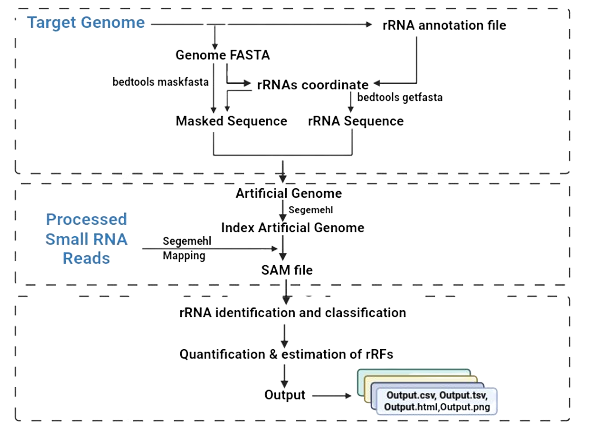
rsRNAfinder workflow diagram

Key Features

Designed for precision, scalability, and clarity in rsRNA discovery.

sRNA‑seq analysis

In‑depth analysis of reference‑aligned sRNA‑seq data for accurate rsRNA annotation and quantification.

Parametric reporting

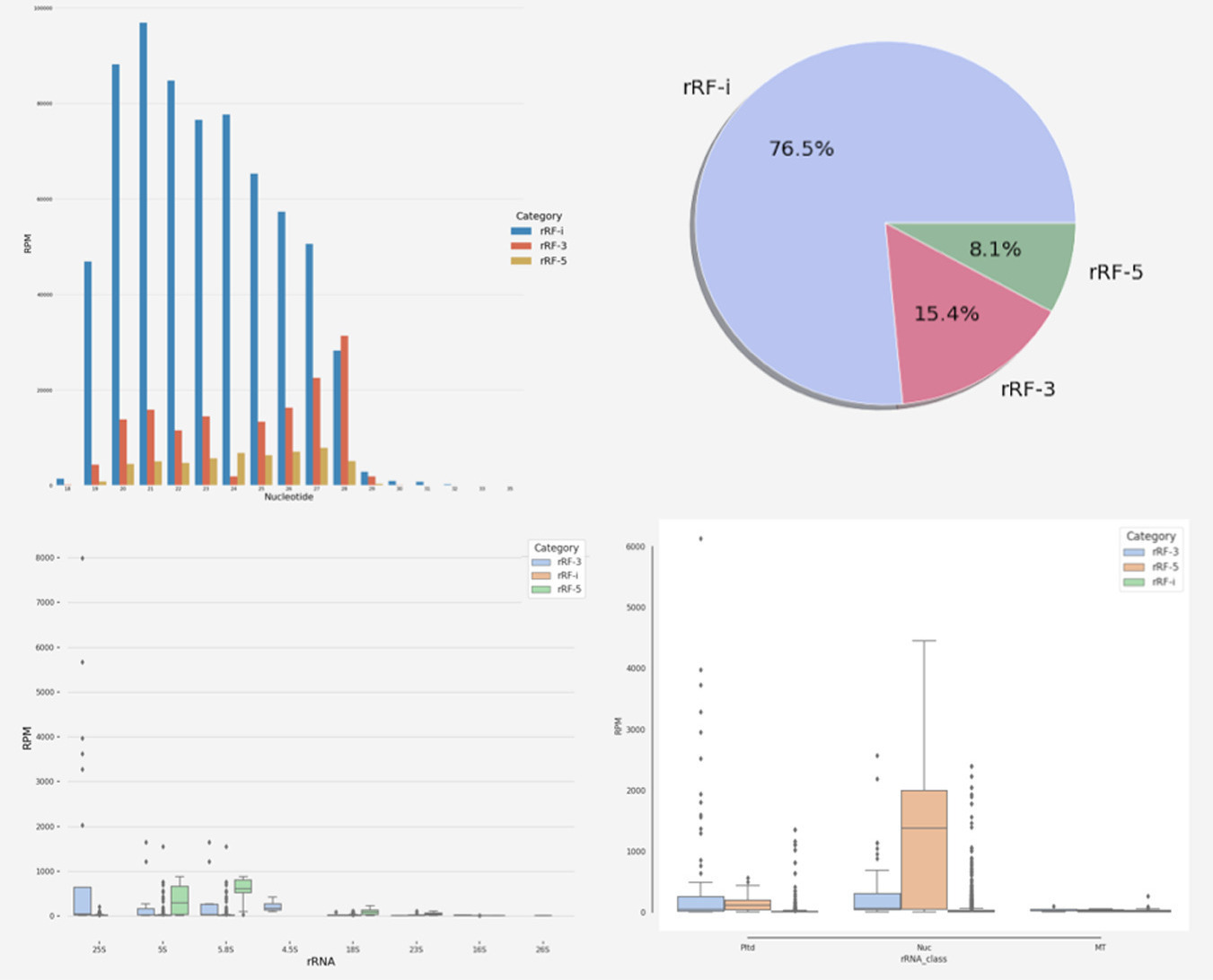
Reports include size distributions, strandedness, genomic origin, and source rRNA details.

Illustrative validation

Distinguishes distinct rsRNAs from all rRNA types by identity, abundance, and length.

User Manual

Step‑by‑step guide to download, configure, and run rsRNAfinder.

1 Download

Download the rsRNAfinder Toolkit package: rsRNAfinder.tar.gz

2 Prerequisites

3 Deploy the workflow

Clone the repository and set up the environment:

git clone https://github.com/skbinfo/rsRNAfinder.git

Install Snakemake and dependencies:

conda activate base
conda env create -f config/environment.yml
conda activate rsRNA

OR manually install:

conda activate base
conda create -n rsRNA python=3.7 --no-default-packages
conda activate rsRNA
pip install snakemake==7.20.0
conda install -c bioconda bedtools==2.30.0
pip install seaborn
conda install -c conda-forge matplotlib
conda install -c bioconda segemehl==0.2.0
conda install -c bioconda samtools
conda install -c conda-forge biopython
conda install -c bioconda viennarna

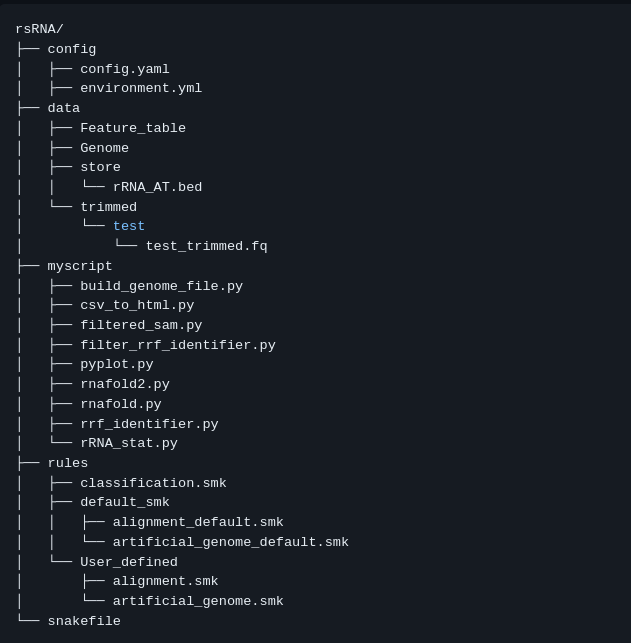
Directory structure Figure 1: Files inside the main directory

4 Configure the workflow

Modify config/config.yaml to suit your data.

  • For Arabidopsis thaliana — no changes needed. Place trimmed FASTQ files in data/trimmed/ with names like {xyz}_trimmed.fq.
  • For other genomes — add FASTA to data/Genome/ and feature table to data/Feature_table/. Update config parameters accordingly.

Ensure genome headers follow: >chr[Num], >chrMt, >chrPt.

5 Run the workflow

From the ~/rsRNAfinder/ directory, execute:

snakemake --cores 8 -q

6 Results

Outputs are written to result/ and intermediate/.

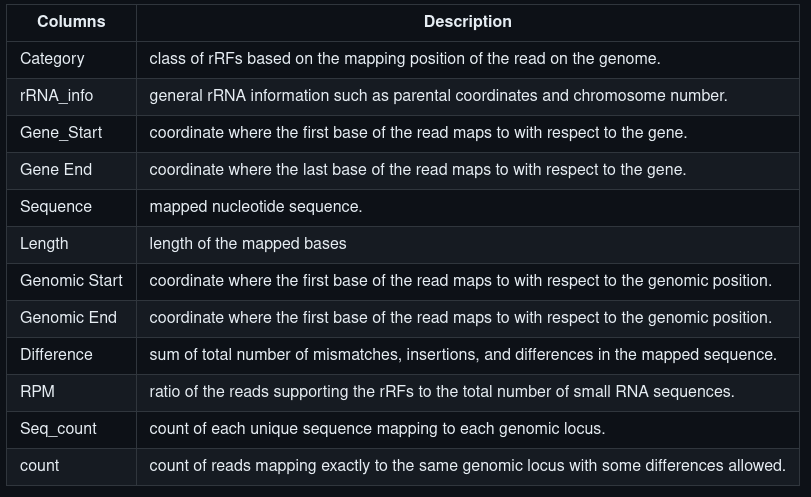
  • CSV — rRF details: length, sequence, counts, gene, genomic positions, etc.
  • HTML — abundant rRFs with dot‑bracket notation.
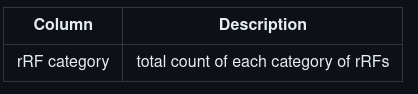
  • TSV — count of each rRF class per sample.
  • Graphs — pie, bar, and box plots for distribution visualisation.

CSV output Figure 2: CSV file format

HTML output Figure 3: HTML file format

TSV output Figure 4: TSV file format

Graphical output Figure 5: Graphical representation of rRFs

Frequently Asked Questions

Troubleshooting common issues.

1. Error while loading shared libraries: libncurses.so.5
sudo ln -s /usr/lib64/libncurses.so.6 /usr/lib64/libncurses.so.5
2. IncompleteFilesException: The files below seem to be incomplete
snakemake --cores 8 -q --ri
3. Automate removal of SAM file

Change "intermediate/SAM/{name}/{dir}/{sample}/{sample}_trimmed.sam" to temp("intermediate/SAM/{name}/{dir}/{sample}/{sample}_trimmed.sam") in rsRNAfinder/rules/default_smk/alignment_default.smk.

Team Members

Designed & developed by the Dr. Shailesh Kumar research group at NIPGR, New Delhi.

A.T. Vivek

A.T. Vivek

PhD Scholar
National Institute of Plant Genome Research
Garima Kalakoti

Garima Kalakoti

Project Associate
National Institute of Plant Genome Research

Contact Us

Get in touch with the lab.

Dr. Shailesh Kumar

Dr. Shailesh Kumar

Staff Scientist

National Institute of Plant Genome Research

New Delhi, India

shailesh@nipgr.ac.in

+91-11-26735217